 Controllers
 Mixers
 Speakers
 Headphones
 Microphones
 Turntables
 Accessories
 Cartridges
 Legacy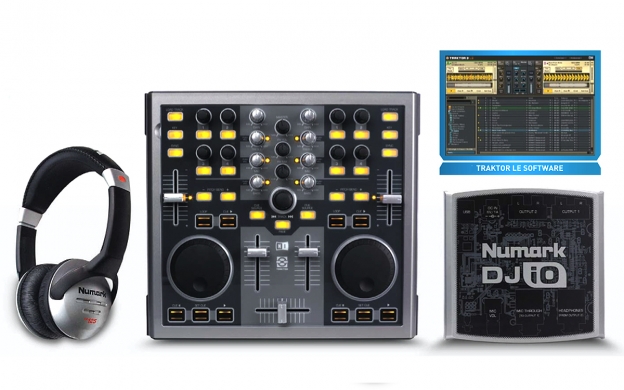
Total Computer DJ in a Box is the perfect way to get started DJing today. The kit gives you everything you need to DJ using your computer.
Mix and scratch on TOTAL CONTROL, the scratch control surface designed expressly for computer DJs. DJ|iO gets audio into and out of your computer for connection to the PA system and for cueing with the included pro-grade HF125 headphones. Total DJ in a Box even comes with Traktor LE heavy-hitting DJ software from Native Instruments.
TOTAL CONTROL is laid-out just like a DJ mixer or CD player, with scratch wheels, line faders, EQ knobs, and a crossfader, so it’s easy to jump to any other DJ’s system. 31 buttons, 20 knobs, and five faders give you power at the gig. And it’s USB-powered, so you’re not chained to a wall outlet.
TOTAL CONTROL uses MIDI so it’s compatible with most DJ software, and it even comes with pre-mapped controls and an overlay to work directly with Traktor LE with no programming needed.
DJ|iO is a compact, rugged computer interface that gets audio into and out of your computer on an easy USB connection. It has a mic input, two sets of RCA outs, and a headphone jack to handle all of your audio system connections. CD-grade 24-bit, 44.1/88.2 kHz audio powered by ultra-low-latency ASIO drivers gives DJ|iO the high-quality sound you expect from Numark.
Without a great pair of headphones, rocking the house is really tough. That’s why Total Computer DJ in a Box comes with HF125 DJ headphones. You’ll be thinking “My Mic Sounds Nice” when you hear your jams through these killer cans. HF125s feature seven-position adjustable earcups housing large 40mm mylar speaker drivers, a six-foot tangle-resistant cable, a padding on the headband and earcups.
Turn on, plug in and rock out tonight with Total Computer DJ in a Box.
FEATURES
- Complete DJ package for use with Mac or PC
- TOTAL CONTROL hardware control surface with 20 knobs, five faders, and 31 buttons
- Scratch wheels, crossfader, and EQ knobs all laid-out in DJ mixer format
- DJ|iO computer interface for getting audio into and out of your computer
- Two sets of RCA stereo outputs
- Microphone input with adjustable gain
- 1/4-inch stereo headphone output
- High-quality 24-bit, 44.1/88.2 kHz audio
- ASIO audio drivers with control panel
- Includes HF125 DJ headphones for accurate cueing
- TRAKTOR LE DJ software included
- Pre-mapped controls and overlay eliminates programming when used with TRAKTOR LE
- USB-powered, no wall power needed for portability
- Plug-and-play USB: no driver installation needed
INCLUDES
- TOTAL CONTROL DJ Controller
- DJ|iO USB Audio Interface
- HF125 DJ Headphones
- Software CD
- (2) USB Cables
Minimum System Requirements (PC):
- Windows XP SP2 (32-bit) or Vista (32-bit)
- Pentium III or AMD Athlon 1GHz
- 512MB RAM
- USB 2.0 Port (single channel operation with USB 1.1)
Minimum System Requirements (MAC):
- Mac OSX 10.4 or higher
- G4 1.5 GHz or Intel Core Duo 1.6GHz
- 512MB RAM
- USB 2.0 Port (single channel operation with USB 1.1
- Does this work with Mac or PC?
- Total Computer DJ in a Box works with both Mac and PC. Please see the system requirements for more details.
- What other software can I control with this package?
- Total Computer DJ in a Box uses MIDI so it is compatible with nearly all music production software. Check your favorite software to see what its MIDI capabilities are. You should be able to assign functions on the included Total Control hardware controller to functions on your favorite MIDI-compliant software.
- The Total Control is not lighting up. Is something wrong?
- NOTE: the Total Control will not light up when connected to the computer. This is normal. The LEDs will only be able light up once the included TRAKTOR LE software is completely and properly configured. The software must tell the LEDs to light


