Skip navigation

TOTAL CONTROL Portable Performance Controller

High-quality software performance.

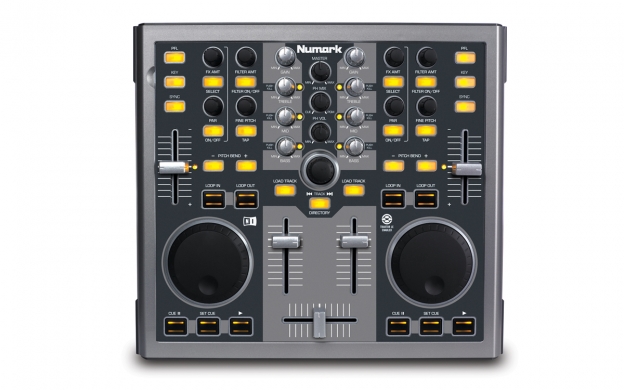
TOTAL CONTROL is a powerful control surface for performing and producing with DJ software. The time-tested layout works just like two decks and a mixer so whether you're a seasoned professional or just honing your skills, TOTAL CONTROL is easy to learn and capable of advanced technique. It's portable so you can grab TOTAL CONTROL and your laptop and go to wherever the gig is.


FAMILIAR LAYOUT


TOTAL CONTROL has two deck controller sections with large jog wheels and transports controls so whether you're used to a CD player, turntables, or any other traditional DJ hardware, you'll find getting around easy. The center of TOTAL CONTROL's surface is its mixer section with a smooth crossfader, line faders, deck EQs, and more advanced controls for looping and effects.


TRAKTOR ENABLED, MIDI COMPLIANT

TOTAL CONTROL comes with Native Instruments Traktor LE software, which is based on Traktor Pro. It gives you four optional layouts, including cover art. You will enjoy new Beatgrid Editing and saving with locked sync for precise performance. New in Traktor LE is manual looping and selectable loop length for flexible loop integration. Additionally, Traktor LE gives you a choice of effects per deck including filter, delay, reverb and flanger. TOTAL CONTROL comes factory mapped for use with Traktor Pro or LE for out-of-the-box performance. It's compatible with Mac and PC, and works with nearly any audio format.


EASY USB CONNECTION

TOTAL CONTROL connects to your Mac or PC as a class-compliant USB device so it requires no software drivers to work, and USB powers it so you won't need an external supply.

  • Classic, dual-deck layout with complete mixer section
  • Lighted controls indicate status in software for less time looking at the computer
  • MIDI-over-USB controller is compatible with most DJ software
  • Mac and PC class-compliant USB device requires no software drivers
  • USB-powered device requires no power supply
  • Includes Native Instruments Traktor LE software; mapped for Traktor Pro
  • Kensington lock slot for theft prevention

Includes:

  • TOTAL CONTROL controller
  • USB cable
  • Software CD
  • Quick start guide

* Check the Documents & Downloads tab for latest updates.

Minimum System Requirements (PC):
  • Windows XP SP2 (32-bit) or Vista (32-bit)
  • Pentium III or AMD Athlon 1GHz
  • 512MB RAM
Minimum System Requirements (MAC):
  • Mac OSX 10.4 or higher
  • G4 1.5 GHz or Intel Core Duo 1.6GHz
  • 512MB RAM
Show All
  • The Total Control is not lighting up. Is something wrong?

    • NOTE: the Total Control will not light up when connected to the computer. This is normal. The LEDs will only be able light up once the included Traktor LE software is completely and properly configured. The software must tell the LEDs to light…they will not light on their own.

    • To verify that the device is being seen by the computer…

      1. On Windows 7, Vista or XP, open the Device Manager.
      2. Disconnect the USB cable form the Total Control, count to 5, then reconnect the Total Control.
        Does the list of devices in the Device Manager change, refresh, or flash (even for a split second)? If yes…Good, the Total Control is recognized by the computer.

    • If the device is being seen by the computer, as described above, follow the instructions in this guide to get setup (also available on the Total Control page on numark.com).

    • If the device is not being seen by the computer, as described above, perform the following, then re-test as described above:

      1. Try connecting the Total Control to a different USB port on your computer. Not all ports are created equal. One or some of the ports on your computer may not be suitable for working with USB MIDI or Audio interfaces.
      2. Try a different USB cable. Cables do occasionally go bad, so it is a good idea to rule this out as a potential cause. Borrow your printer's USB cable to test with.
      3. Try disconnecting any other USB devices from your computer except for your keyboard and mouse. If you're planning to use USB audio interface along with your Total Control, leave that connected too.
      4. If a Logitech USB Camera is, or has been in use on the same computer, this driver will conflict with other plug and play USB Audio pr MIDI devices. Please contact our Technical Support department. We can help get you up and running!
      5. If the connection test above still indicates the device is not being seen, you can try connecting the Total Control to a different computer (remember, no software needs to be installed, and it will only take about 30 seconds) to help determine the cause.
      6. If you are still experiencing difficulty, if you have any questions, or if there's anything we can do to help, please contact our support team for assistance.
Manuals & DocumentationSizeType
Total Control - Product Overview
1 MBpdf
Total Control - Setup with Traktor LE
681 KBpdf
Total Control - QuickStart Guide [v1.5]
1 MBpdf
Total Control - MIDI Map
154 KBpdf
CUE LE - Reference Manual for Version 5.x
1 MBpdf
CUE LE - Reference Manual for Version 4.3
3 MBpdf
Traktor LE - Using with Mac OS 10.6 Snow Leopard
42 KBpdf
Software & DriversSizeType
CUE LE - Software Update for Windows and Mac [v5.21]
10exe/dmg
CUE 5 - 20 Day Trial Software for Windows XP & Vista
A full-featured trial version of CUE with a 20 day time limit.
11 MBexe
Total Control - Trakor 3 MIDI Map TKS File
This MIDI Map file adds Total Control control-surface support to Native Instruments' Traktor 3 (full version). This file is not needed or compatible with the Traktor LE software which is included with the Total Control.
2 KBzip
Total Control - Trakor PRO MIDI Map TSI File
This MIDI Map file adds Total Control control-surface support to Native Instruments' Traktor PRO (full version). This file is not needed or compatible with the Traktor LE software which is included with the Total Control.
100 KBzip
 
Have questions about the V7 Controller? Click here.  We're here to help! Have questions? Need help? Click here!
  
Back to TOTAL CONTROL
 TOTAL CONTROL
close  
of 1
 
Back to TOTAL CONTROL
 TOTAL CONTROL
close  
of 1