 Controllers
 Mixers
 Speakers
 Headphones
 Microphones
 Turntables
 Accessories
 Cartridges
 Legacy
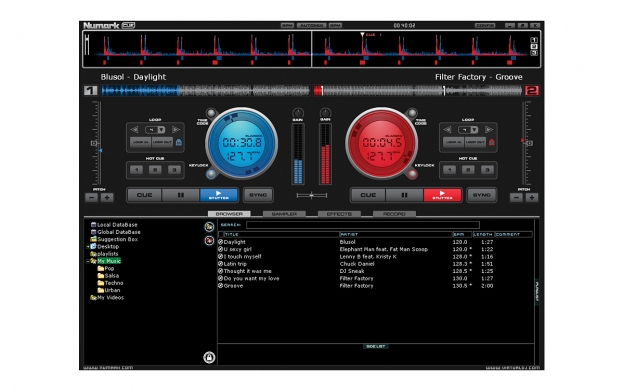
Streamlined, social, and connected.
YOUR MIX… YOUR SOFTWARE
COMPLETE COMPATIBILITY
Cue enables you to play directly from a CD or from a variety of digital audio files including MP3, MP3Pro, MP4, M4A, WAV, AIFF, DVD, WMV, CDA, WMA, ASF, OGG, and iTunes ACC (non-DRM). On the video side of things, Cue handles DVD, VOB, DIVX, MPG (1, 2, 4), AVI, WMV, and Karaoke (CD+G) files with ease. Cue also supports VST plug-ins and is compatible with virtually any MIDI controller including NS7, V7, Total Control, Stealth Control, Omni Control, Mixtrack, iDJ3, iCDX, M1USB, C3USB, X1USB, DJ|iO, Virtual Vinyl, as well as, Akai Professional MPD, LPK and LPD controllers. Cue also supports DirectX and multi-channel ASIO.
HENCE THE NAME
MASTERFUL MIXING
SEARCH WITHOUT SEIZURE
VIBRANT VIDEO
PRO PLAYBACK
FEATURES
- Reliable, intuitive DJ software for mixing audio and video
- Mix, scratch, juggle, and sample audio and video on two virtual decks
- Customize style and layout by selecting from different software skins
- Play audio and playlists from CD, DVD, MP3, WAV, iTunes, and much more
- Play video from DVD, VOB, DIVX, MPG (1, 2, 4), AVI, WMV, and Karaoke (CD+G)
- Works with VST plug-ins, DirectX, and multi-channel ASIO
- Cue video on-screen, and output it to projectors, TVs, and other screens
- Cue audio in headphones and output it to virtually any sound system
- Broadcast video and audio on the web
- See the visual waveform of the track in CUE’s Rhythm Window
- Automatically sync tracks together for effortless song transitions
- Automatically detects BPM on virtually any track
- Create beat–matched loops and samples for on the fly remixes
- Powerful, fast global searching based on nine different tag types
- Smart database management automatically checks and repairs your library
- Play History Management automatically records what you played and when
- Support for Numark MIXTRACK and IDJ3
- Support for Akai Pro MPD controllers, LPK25 and LPD8
- Support for Numark V7, NS7, OMNI CONTROL, STEALTH CONTROL and TOTAL CONTROL
- Supports premium membership from Virtual DJ
- Lower latency and better sound for motorized wheels
- 64 bit drivers for the Virtual Vinyl box are included in the new Virtual Vinyl setup
- System Requirements:
- Mac: OS X (10.4 – 10.6), Intel Core Duo 2GHz
- Windows: Windows 7 (32-bit & 64-bit) Windows Vista (32-bit & 64-bit) or XP (32-bit), P4 3GHz or higher, DirectX 3D video card
- 1024x768 screen resolution or higher
- Audio interface with multiple outputs (such as DJ|iO)
- 1GB RAM
- 200MB hard disk space
- USB 2.0 port
- Macintosh: OS X (10.4 - 10.6)
- Windows: Windows 7 (32-bit & 64-bit) Windows Vista (32-bit & 64-bit) or XP (32-bit), Dual Core CPU 2GHz or higher, DirectX 3D video card
- 1024x768 screen resolution or higher
- ATI or nVidia video card w/256Mb of Dedicated DDR3 memory (dual output capable)
- Audio interface with multiple outputs (such as DJ|iO)
- 2GB RAM
- 200MB hard disk space
- USB 2.0 port
- What hardware controllers are supported in Cue?
The following Numark hardware controllers are supported in Cue v.6.1.2
- DMC2
- iCDX
- iDJ3
- MixDeck
- MixTrack
- MixTrack Pro
- NDX800
- NS7
- NSFX
- OmniControl
- StealthControl
- TotalControl
- V7
Additionally, the following third-party hardware controllers are supported v.6.1.2:
- Denon DN-S3700
- Denon HC-1000S
- DJ-Tech I-Mix
- DJ-Tech I-Mix Reload
- DJ-Tech I-Mix Reload MKII
- DJ-Tech Kontrol One
- EKS OTUS Internal Mixer
- EKS XP10
- EKS XP10 VDJ-edition
- FactoriesF KTRL
- Generic ME100
- Generic ME120SC
- Generic ME701SC
- Hercules DJConsole
- Hercules DJConsole MK2
- Hercules DJConsole MK4
- Hercules DJConsole Mobile
- Hercules DJConsole MP3
- Hercules DJConsole MP3 e2
- Hercules DJConsole RMX
- Hercules DJConsole Steel
- ION Discover DJ
- ION iCue
- Keyboard
- KORG nanoPad
- M-Audio XPonent
- M-Audio/Evolution X-SESSION
- PCDJ DAC2
- PCDJ DAC3
- Pioneer CDJ-2000
- Pioneer CDJ-350
- Pioneer CDJ-400
- Pioneer CDJ-850
- Pioneer CDJ-900
- Pioneer MEP7000
- Pioneer MEP7000(SDJC1)
- Reloop DigitalJockey
- Simple MIDI wrapper
- Stanton DaScratch SCS.3d
- Stanton DaScratch SCS.3m
- Synq DMC.1000
- Synq PCM-1
- Vestax VCI-100
- Vestax VCI-300
- Vestax VCM-100
- Vestax VFX1


